Dear HarmonySite administrator,
Some more new features for your HarmonySite to announce today (in no particular order)...
Bulk-record attendance
In certain circumstances, when recording attendance after an event, it may be easier to mark everyone as "Present" in one simple operation, and then manually mark the few people that are absent. Or vice-versa: Bulk-set everyone as "Absent", and then manually mark the few people that are present. You can now do such things at the bottom of your "Attendance" page...
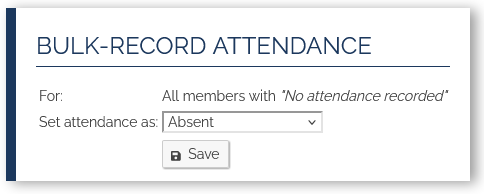
It will only set an attendance status for people that currently don't have one.
NOTE: Be careful bulk-setting people as absent. If all those people were actually expected to be at the event, then that's fine. But there's an important distinction between marking someone as absent (by ANY means) and not recording any attendance for the person at all. If you mark someone as absent (or any other "non-attended" status), then that counts negatively towards their attendance statistics. Only do that if they were actually supposed to be at the event and were not. If someone is not actually expected at an event, then don't record anything for them, for that event, so that it doesn't count negatively towards their statistics.
Visitors Book
HarmonySite has always had a "Visitors Book", but it was never publicised as a feature, because it wasn't working properly. That's been fixed now, so we can let you know it's there, if you want it. It's a way to record visitors that may have come to your rehearsals or other events. It captures their details, and adds them to the "member" database, as a "Visitor", and marks them as having attended that event (as a visitor). With their details in the member database, it's easy to later convert them from a "Visitor" to a "Member", if they ever decide to join your group, or you want their email address for your mailing list, etc.
It works like this: You would need something like an iPad or laptop, connected to the Internet, at your event. A phone will work too, but phones are less convenient to type on. Logged in as an administrator, you would pull up the Visitors Book page, click the link at the top called "Prepare the Visitors Book to be signed by a visitor to the event in progress", click the "Sign the Visitors Book" button, and hand the phone/iPad/laptop to the visitor...
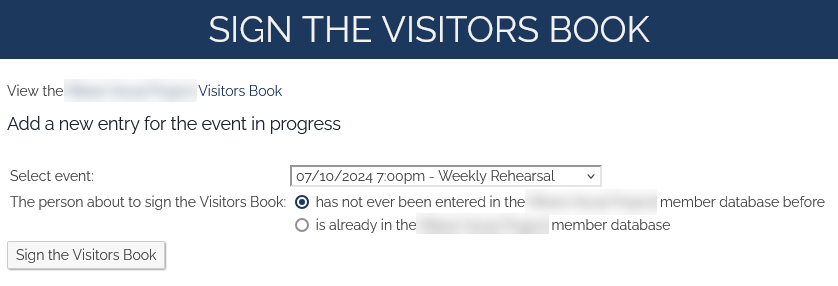
This will actually LOG YOU OUT, because you don't want any visitors being able to access administrative functionality in your HarmonySite, which they would be able to do if you didn't log yourself out, and you weren't watching them closely. You can sign yourself back in after you get your device back from the visitor.
App: Dark mode
The App now has a dark mode...
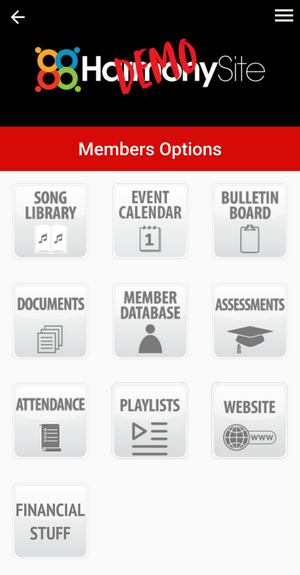
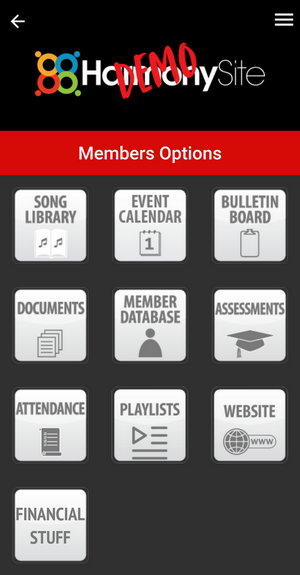
Switch between the two modes by clicking the "Light/Dark mode" link in the App's sidebar (accessible via the "three lines" icon in the top-right corner of the App screen).
New Localisation features: Time format and First day of week
Especially for our European users, we now have the following settings available...
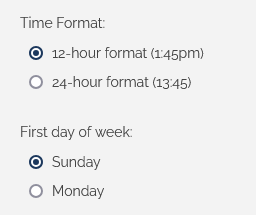
To find these options, click the little "cog" icon in the top-right corner, then click the cog icon next to "HarmonySite", and scroll down a little.
Instagram widget (and shortcode)
As you will likely be aware, if you have a public-facing component in your HarmonySite, many of your public-facing pages have a "sidebar" down the right-hand side of many public-facing pages. That sidebar usually contains your Facebook feed. We now have the option of including an Instagram feed as well, if desired. It would look something like this...
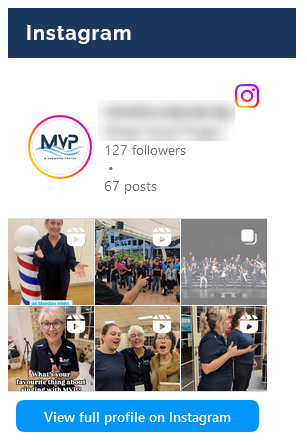
To include this in your HarmonySite's sidebar, click the little "cog" icon in the top-right corner, then click the cog icon next to "HarmonySite". Then click the "Footer/Sidebar" tab, and scroll down to the "Sidebar" section. You'll see this...
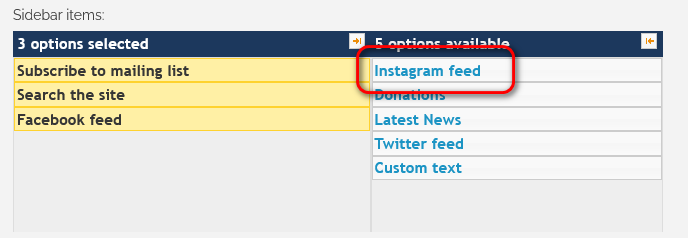
To add the Instagram feed to your sidebar, click once on it in the right-hand column, which will move it across to the left-hand side (meaning it will be shown in your sidebar). You can then drag it up or down to position it correctly with respect to the other "widgets" listed on the left-hand side. Be sure to save your changes.
For this to work, your HarmonySite will need to already have your Instagram page configured correctly. To do this, click the little "cog" icon in the top-right corner, then click the cog icon next to your primary ensemble. Then click the "Promotion" tab and scroll to the bottom.
There's also a "shortcode" for your Instagram feed, meaning that you can actually put your Instagram feed ANYWHERE you want on your site. Simply edit the page where you want it, and add [instagram] (note the lowercase "i") wherever you want the feed. It can be customised - you can specify the widget's width and height - or even a completely different Instagram account. Full details are on your "Shortcodes" page (the link is on your Admin Dashboard).
Slideshows from photo galleries
You may have uploaded some photos into the "Photos" section of your HarmonySite. These photos are organised into "galleries". It's now possible to have a slideshow on ANY page, which automatically displays all of the photos in a gallery you specify, rotating through them every few seconds.
This is done by using a "shortcode", which would look something like this...
[gallery id="21"]
For more fine control, you can specify a width/height (in pixels) and timing (in seconds) for the slideshow, like this...
[gallery id="21" width="500" height="500" timing="6"]
Full details are on your "Shortcodes" page (the link is on your Admin Dashboard).
SMS text messages can no longer be sent from USA or Canada
New telecommunications regulations state that text messages sent by organisations (as opposed to individuals) must come from registered dedicated phone numbers. No HarmonySite groups have phone numbers for this purpose, so we have no choice but to remove this functionality from US and Canadian HarmonySites.
An alternative would be to use the "push notifications" feature of the HarmonySite APP. It functions effectively the same way, and is totally FREE to send messages (SMS text messages cost 11 cents per message per member). Sending App push notifications requires that you have the App enabled for your group, of course. And it will only be effective if all your members have installed the App and logged into it at least once.
If you are in the US or Canada, and still wish to use the SMS facility, you will need to get one of these dedicated phone numbers. They cost money. I'm not sure how much exactly (I haven't checked with our SMS provider), but I believe they're around $40 per year. If you don't mind paying that fee, please email me, and I'll get one happening for you.
That's all for now. Enjoy the new features...
In harmony,
Mark Virtue
HarmonySite
Australia
+61 2 8005 4277 (Australian number)
In North America, call: 1-415-651-7009 (San Francisco number)
Skype name: mvirtue